Disclaimer

Thursday, 19 August 2021

Dead Connection Detection (DCD) - Oracle

Oracle Database : Understanding Dead Connection Detection, Resource Limits, V$SESSION, V$PROCESS and OS processes

Dead Connection Detection (DCD)

These are previously valid connections with the database but the connection between the client and server processes has terminated abnormally.

Examples of a dead connection:
– A user reboots/turns-off their machine without logging off or disconnecting from the database.
– A network problem prevents communication between the client and the server.

In these cases, the shadow process running on the server and the session in the database may not terminate.

Implemented by

* adding SQLNET.EXPIRE_TIME = [MINUTES] to the sqlnet.ora file 

With DCD is enabled, the Server-side process sends a small 10-byte packet to the client process after the duration of the time interval specified in minutes by the SQLNET.EXPIRE_TIME parameter.

If the client-side connection is still connected and responsive, the client discards the probe packet, ..and another packet will be sent when next interval expires (assuming no other activity on the connection).

If the client fails and client OS sends back an error in responding to the DCD probe packet

  • the Server side process is marked as a dead connection and
  • PMON performs the clean up of the database processes / resources
  • The client OS processes are terminated
NOTE: SQLNET.RECV_TIMEOUT can be set on the SERVER side sqlnet.ora file. This will set a timeout for the server process to wait for data from the client process.

Inactive Sessions

These are sessions that remain connected to the database with status in v$session of INACTIVE. For inactive sessions and not dead connection, use below profile or resource manager method to control.

Example of an INACTIVE session:
– A user starts a program/session, then leaves it running and idle for an extended period of time.

Database Resource Limits (using user profiles)

Implemented by:

  • Setting RESOURCE_LIMIT = TRUE in the database startup parameter file (spfile or pfile)
  • Creating or modifying existing user profiles (DBA_PROFILES) to have one or more resource limit
  • Assigning a profile to a user whose resources are wished to be limited

It could happen that if the idle_time has been set on the DEFAULT profile, this can lead to an MTS dispatcher being set to ‘sniped’ and then getting ‘cleaned up’ via the shell script. The removal of the dispatcher will result in other sessions ‘dying’. In that case, If you are to implement resource limits, may be advisable to create new profiles that be assigned to users and not to change the characteristics of DEFAULT. Alternatively, if you do change DEFAULT, ensure that all the properties that you have affected have been fully tested in a development environment.

When a resource limit is exceeded (for example IDLE_TIME) … PMON does the following

  • Mark the V$SESSION as SNIPED (Older Versions) or KILLED (Newer Versions)
  • Clean up the database resources for the session
  • Remove the V$SESSION entry

When a resource limit is exceeded (for example IDLE_TIME) … PMON marks the session as SNIPED in V$SESSION. Then, AFTER the SNIPED session tries to execute any SQL statement, its database resources are cleaned up and its V$SESSION entry is removed.

Resource Manager

Resource manager plans can be created to kill inactive sessions with high idle time. Refer to How To Automatic Kill Inactive Sessions using Resource Manager (Doc ID 1935739.1). This document contains the details with an example. You can customize the plan directives as per your requirement.

In this case, once the inactive time goes beyond the specified MAX_IDLE_TIME, PMON marks the session as KILLED. When this KILLED later tries to execute any SQL statement, its database resources are cleaned up and its V$SESSION entry is removed.

It is strongly recommended that both DCD and Resource Limits with Profiles be implemented in order to clean up resources at both the database and OS level.

This combination will not clean up IDLE / ABANDONED / INACTIVE connections (OS processes) as these sessions still have active clients

For this case we will see that :

  • PMON has cleaned up the V$SESSION entries .. but both the OS processes and the V$PROCESS entries will still exist
  • SQLNET will continue to be able to send the 10 byte packet successfully until the session is logged off

This condition can be a major problem as

  • The database exhausts PROCESSES and gives ORA-20 maximum number of processes [num] exceeded
  • The OS can become exhausted due to the un needed resources consumed by the abandoned processes

The SYMPTOMS of this condition are:

  • The database view V$PROCESS will have no corresponding V$SESSION entry
  • An OS process / thread still exists for the SNIPED session

The solutions to this scenario can are to clean up the OS processes … after which the V$PROCESS entries should be removed automatically.

Conclusion

1) DCD initiates clean up of OS and database processes that have disconnected/terminated abnormally.

2) DCD will not initiate clean up sessions that are still connected … but are idle / abandoned / inactive.

3) Database Resource Limits + user Profiles clean up database resources for user sessions that exceed resource limits.

4) Database Resource Limits + user Profiles will not clean up OS processes.

5) If DCD and Database Resource Limits + user Profiles are used in combination .. Dead Connections OS and Database Resources will be cleaned up.

6) IDLE / ABANDONED / INACTIVE sessions OS processes will not be cleaned up even if DCD and Database Resource Limits + user Profiles are used in combination … these must be cleaned up manually.

7) Resource Manager can be used to kill an inactive session, which exceeds the idle time mentioned in the plan directives.

Wednesday, 18 August 2021

Switch over and switch back database using DATAGUARD broker

 
Switch over and switch back database using DATAGUARD broker
==========================================

Check the  Database Is Ready for a Role Change
It will checks whether it is ready for switchover.

DGMGRL> VALIDATE DATABASE 'ORCL';

DGMGRL> VALIDATE DATABASE 'ORCL';

  Database Role:    Primary database
  Ready for Switchover:  Yes
  Flashback Database Status:
    orcl:  Off
  Managed by Clusterware:
    orcl:  NO
    Validating static connect identifier for database orcl...
Unable to connect to database using (DESCRIPTION=(ADDRESS=(PROTOCOL=tcp)(HOST=rac8.samik.com)(PORT=1521))(CONNECT_DATA=(SERVICE_NAME=ORCL_DGMGRL)(INSTANCE_NAME=ORCL)(SERVER=DEDICATED)(STATIC_SERVICE=TRUE)))
ORA-12514: TNS:listener does not currently know of service requested in connect descriptor
Failed.
    Warning: Ensure primary database's StaticConnectIdentifier property
    is configured properly so that the primary database can be restarted
    by DGMGRL after switchover


---------
Oracle Data Guard Broker and Static Service Registration (Doc ID 1387859.1)
Note: Static "_DGMGRL" entries are no longer needed as of Oracle Database 12.1.0.2 in Oracle Data Guard Broker configurations that are managed by Oracle Restart, RAC On Node or RAC as the Broker will use the clusterware to restart an instance.

Solution:- 
edit database ORCL set property StaticConnectIdentifier='ORCL';

===================
Connect to the Primary Instance : using dgmgrl utility

Before Switchover status (Primary):

SQL> select status,instance_name,database_role from v$database,v$instance;
STATUS       INSTANCE_NAME    DATABASE_ROLE
------------ ---------------- ----------------
OPEN         ORCL             PRIMARY


Before Switchover status (Standby):


SQL> select status,instance_name,database_role from v$database,v$instance;
STATUS       INSTANCE_NAME    DATABASE_ROLE
------------ ---------------- ----------------
MOUNTED      ORCLDG           PHYSICAL STANDBY


-------------Actual Switchover--------------------


[oracle@rac8 ~]$ dgmgrl sys/sys#123@ORCL
DGMGRL for Linux: Release 18.0.0.0.0 - Production on Wed Aug 18 01:26:44 2021
Version 18.3.0.0.0
Copyright (c) 1982, 2018, Oracle and/or its affiliates.  All rights reserved.
Welcome to DGMGRL, type "help" for information.
Connected to "ORCL"
Connected as SYSDBA.
DGMGRL>

DGMGRL>
DGMGRL> switchover to ORCLDG;
Performing switchover NOW, please wait...
Operation requires a connection to database "orcldg"
Connecting ...
Connected to "ORCLDG"
Connected as SYSDBA.
New primary database "orcldg" is opening...
Operation requires start up of instance "ORCL" on database "orcl"
Starting instance "ORCL"...
Unable to connect to database using ORCL
ORA-12505: TNS:listener does not currently know of SID given in connect descriptor
Failed.
Warning: You are no longer connected to ORACLE.
Please complete the following steps to finish switchover:
        start up and mount instance "ORCL" of database "orcl"
DGMGRL>
DGMGRL>
DGMGRL>
DGMGRL> exit

[oracle@rac8 ~]$

[oracle@rac8 ~]$ ps -ef| grep smon
grid      24391      1  0 Aug17 ?        00:00:00 asm_smon_+ASM
oracle    87178  32455  0 02:28 pts/1    00:00:00 grep --color=auto smon
[oracle@rac8 ~]$


-------Check the database status at Standby with become primary now-------

STATUS       INSTANCE_NAME    DATABASE_ROLE
------------ ---------------- ----------------
OPEN         ORCLDG           PRIMARY


[oracle@rac8 ~]$ sqlplus '/as sysdba'
SQL*Plus: Release 18.0.0.0.0 - Production on Wed Aug 18 02:36:03 2021
Version 18.3.0.0.0
Copyright (c) 1982, 2018, Oracle.  All rights reserved.
Connected to an idle instance.

SQL> startup nomount;
ORACLE instance started.
Total System Global Area 1174403152 bytes
Fixed Size                  8656976 bytes
Variable Size             436207616 bytes
Database Buffers          721420288 bytes
Redo Buffers                8118272 bytes
SQL>
SQL>
SQL> alter database mount standby database;
Database altered.

---Primary 07 -- 
SQL> alter system switch logfile;
SQL> archive log list;
Database log mode              Archive Mode
Automatic archival             Enabled
Archive destination            +DATA/orcldg
Oldest online log sequence     353
Next log sequence to archive   355
Current log sequence           355

---Standby 08 --Automatically enable MRP by broker-


SQL> SELECT ARCH.THREAD# "Thread", ARCH.SEQUENCE# "Last Sequence Received", APPL.SEQUENCE# "Last Sequence Applied", (ARCH.SEQUENCE# - APPL.SEQUENCE#) "Difference" FROM (SELECT THREAD# ,SEQUENCE# FROM V$ARCHIVED_LOG  WHERE (THREAD#,FIRST_TIME ) IN (SELECT THREAD#,MAX(FIRST_TIME) FROM V$ARCHIVED_LOG GROUP BY THREAD#)) ARCH, (SELECT THREAD# ,SEQUENCE# FROM V$LOG_HISTORY WHERE (THREAD#,FIRST_TIME ) IN (SELECT THREAD#,MAX(FIRST_TIME) FROM V$LOG_HISTORY GROUP BY THREAD#)) APPL WHERE ARCH.THREAD# = APPL.THREAD# ORDER BY 1;


    Thread Last Sequence Received Last Sequence Applied Difference
---------- ---------------------- --------------------- ----------
         1                    354                   354          0

[oracle@rac7 ~]$ dgmgrl
DGMGRL for Linux: Release 18.0.0.0.0 - Production on Wed Aug 18 02:41:13 2021
Version 18.3.0.0.0
Copyright (c) 1982, 2018, Oracle and/or its affiliates.  All rights reserved.
Welcome to DGMGRL, type "help" for information.
DGMGRL>
DGMGRL>
DGMGRL> connect sys/sys#123@ORCLDG
Connected to "ORCLDG"
Connected as SYSDBA.
DGMGRL>
DGMGRL>
DGMGRL>
DGMGRL> show configuration;
Configuration - my_dg_config
  Protection Mode: MaxPerformance
  Members:
  orcldg - Primary database
    orcl   - Physical standby database
Fast-Start Failover: DISABLED
Configuration Status:
SUCCESS   (status updated 13 seconds ago)
DGMGRL>


--Run the command newly become Primary---Switchback from rac7 to rac8


DGMGRL>
DGMGRL> switchover to ORCL;
Performing switchover NOW, please wait...
Operation requires a connection to database "orcl"
Connecting ...
Connected to "ORCL"
Connected as SYSDBA.
New primary database "orcl" is opening...
Oracle Clusterware is restarting database "orcldg" ...
Connected to "ORCLDG"
Switchover succeeded, new primary is "orcl"
DGMGRL>


Note:- We could see that DB was in mount state but when we switchover from rac8 to rac7, DB got down.


[oracle@rac7 ~]$ ps -ef | grep smon
grid      24624      1  0 Aug17 ?        00:00:00 asm_smon_+ASM
oracle    82039      1  0 02:44 ?        00:00:00 ora_smon_ORCLDG
oracle    82462  28479  0 02:46 pts/1    00:00:00 grep --color=auto smon
[oracle@rac7 ~]$
[oracle@rac7 ~]$
[oracle@rac7 ~]$ sqlplus '/as sysdba'
SQL*Plus: Release 18.0.0.0.0 - Production on Wed Aug 18 02:46:16 2021
Version 18.3.0.0.0
Copyright (c) 1982, 2018, Oracle.  All rights reserved.

Connected to:
Oracle Database 18c Enterprise Edition Release 18.0.0.0.0 - Production
Version 18.3.0.0.0

SQL> select status from v$instance;
STATUS
------------
MOUNTED

[oracle@rac8 ~]$ sqlplus '/as sysdba'
SQL*Plus: Release 18.0.0.0.0 - Production on Wed Aug 18 02:48:58 2021
Version 18.3.0.0.0
Copyright (c) 1982, 2018, Oracle.  All rights reserved.

Connected to:
Oracle Database 18c Enterprise Edition Release 18.0.0.0.0 - Production
Version 18.3.0.0.0


SQL> select status,instance_name,database_role from v$database,v$instance;
STATUS       INSTANCE_NAME    DATABASE_ROLE
------------ ---------------- ----------------
OPEN         ORCL             PRIMARY


Configure Data Guard Broker

 Benefits of Data Guard Broker


One of the biggest benefits of Data Guard broker is that is centralizes the configuration, management and monitoring of Oracle Data Guard configurations.

Some of the operations that Data Guard broker simplifies are

  • Create Data Guard configuration between primary and standby databases

  • Add additional standby databases to existing Data Guard configuration

  • Mange Data Guard protection modes

  • Start switchover / failover by just one single command

  • Automate failover in case of primary not reachable

  • Monitor redo apply, gaps and data guard performance

  • Perform all above operations locally or remotely !


1) Stop MRP on standby

=============================

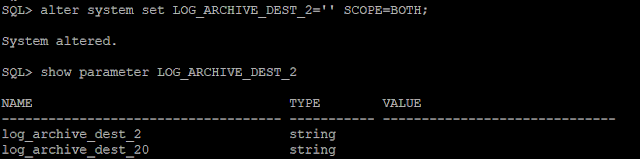
We would like to manage our data guard configuration using Data Guard Broker. Stop MRP and clear Log_Archive_dest_2 parameter


On standby:
===========

SQL> alter database recover managed standby database cancel;


SQL> alter system set LOG_ARCHIVE_DEST_2='' SCOPE=BOTH;


On primary:
===========
SQL> alter system set LOG_ARCHIVE_DEST_2='' SCOPE=BOTH;


Connect to both databases (primary and standby) and issue the following command
==================================================

On primary:
===========

ALTER SYSTEM SET dg_broker_start=true; --------Primary

show parameter dg_broker_start;

SQL> show parameter dg_broker

NAME                                 TYPE        VALUE
------------------------------------ ----------- ------------------------------
dg_broker_config_file1               string      /u01/app/oracle/product/18.3.0.0/dbs/dr1ORCL.dat
dg_broker_config_file2               string      /u01/app/oracle/product/18.3.0.0/dbs/dr2ORCL.dat
dg_broker_start                      boolean     TRUE


On standby:
===========

ALTER SYSTEM SET dg_broker_start=true; --------Standby

show parameter dg_broker_start;

SQL> show parameter dg_broker

NAME                                 TYPE        VALUE
------------------------------------ ----------- ------------------------------
dg_broker_config_file1               string      /u01/app/oracle/product/18.3.0.0/dbs/dr1ORCL.dat
dg_broker_config_file2               string      /u01/app/oracle/product/18.3.0.0/dbs/dr2ORCL.dat
dg_broker_start                      boolean     TRUE


Register primary with broker
===========================

On primary, connect to DGMGRL utility and register the primary database with broker

dgmgrl sys/*****@ORCL

dgmgrl sys/sys#123@ORCL

Connected as SYSDBA.


Add Primary database:
==========================


DGMGRL> CREATE CONFIGURATION my_dg_config AS PRIMARY DATABASE IS ORCL CONNECT IDENTIFIER IS ORCL;

DGMGRL> show configuration;


Register standby with broker
============================

In the same DGMGRL utility, register standby from primary server itself

Add Standby database:
===========================

DGMGRL> ADD DATABASE ORCLDG AS CONNECT IDENTIFIER IS ORCLDG MAINTAINED AS PHYSICAL;

DGMGRL> show configuration;


Enable Data Guard broker
Once primary and standby are registered, we must enable broker

DGMGRL> ENABLE CONFIGURATION;
DGMGRL> SHOW CONFIGURATION;

Configuration - my_dg_config

  Protection Mode: MaxPerformance
  Members:
  orcl   - Primary database
    orcldg - Physical standby database
      Warning: ORA-16853: apply lag has exceeded specified threshold

Fast-Start Failover: DISABLED

Configuration Status:
WARNING   (status updated 12 seconds ago)


Cause: Due to apply lag or transport lag. Check Dataguard configurations for parameter ApplyLagThreshold.
DGMGRL> show database verbose orcl;

Solution
ApplyLagThreshold configurable database property generates a warning status for a logical or physical standby when the database’s apply lag exceeds the value specified by the property.

DGMGRL> edit database ORCLDG set property DelayMins=0;

SOLUTION:
1.Check for the delaymin parametr:

DGMGRL> show database verbose orcldg DelayMins 
DelayMins = ‘0’


DGMGRL> show database ORCLDG;

Database - orcldg

  Role:               PHYSICAL STANDBY
  Intended State:     APPLY-ON
  Transport Lag:      0 seconds (computed 1 second ago)
  Apply Lag:          0 seconds (computed 1 second ago)
  Average Apply Rate: 2.00 KByte/s
  Real Time Query:    OFF
  Instance(s):
    ORCLDG

Database Status:
SUCCESS


Tuesday, 17 August 2021

Check RMAN channel backup progress and waiting in Oracle


Check each channel progress for RMAN Backup in Oracle

Check the channel progress with help of gv$session_longops

set line 200 pages 200
col CLIENT_INFO format a20
col "% Complete" format 999.99
select s.inst_id, o.sid, CLIENT_INFO, context, sofar, totalwork,
                    round(sofar/totalwork*100,2) "% Complete"
     FROM gv$session_longops o, gv$session s
     WHERE opname LIKE 'RMAN%'
     AND opname NOT LIKE '%aggregate%'
     AND o.sid=s.sid
     AND totalwork != 0
     AND sofar <> totalwork;


Example :
INST_ID SID CLIENT_INFO CONTEXT SOFAR TOTALWORK % Complete---------- ------- --------------------- ---------- ---------- ---------- ---------- 1 5 rman channel=aux1 1 104367 45030696 .23 1 6 rman channel=aux9 1 133629 45030696 .30 1 81 rman channel=aux2 1 82413 45030696 .18 1 82 rman channel=aux10 1 89336 45030696 .20 1 161 rman channel=aux11 1 108471 45030696 .24 1 237 rman channel=aux12 1 73979 45030696 .16 1 315 rman channel=aux13 1 79734 45030696 .18 1 391 rman channel=aux3 1 75127 45030696 .17 1 392 rman channel=aux14 1 70778 45030696 .16 1 468 rman channel=aux15 1 65290 45030696 .14 1 544 rman channel=aux4 1 78580 45030696 .17 1 545 rman channel=aux16 1 68605 45030696 .15 1 621 rman channel=aux5 1 97275 45030696 .22 1 622 rman channel=aux17 1 69114 45030696 .15 1 698 rman channel=aux6 1 103829 45030696 .23 1 699 rman channel=aux18 1 75743 45030696 .17 1 776 rman channel=aux7 1 81244 45030696 .18 1 777 rman channel=aux19 1 120317 45030696 .27 1 853 rman channel=aux8 1 92669 45030696 .21 1 854 rman channel=aux20 1 74994 45030696 .17

Check Waiting Event time for RMAN Process

set line 200 pages 200
col CLIENT_INFO format a20
col event format a40
col seconds format 999999.99
select inst_id, sid, CLIENT_INFO, seq#, event, state, wait_time_micro/1000000 seconds
 from gv$session where program like '%rman%' and
wait_time = 0 and
 action is not null;

Check RMAN backup progress of each channel
Note: It include table backup progress also if backup_tape_io_slaves=TRUE:

select s.inst_id, a.sid, CLIENT_INFO Ch, a.STATUS,
open_time, round(BYTES/1024/1024,2) "SOFAR Mb" , round(total_bytes/1024/1024,2)
TotMb, io_count,
round(BYTES/TOTAL_BYTES*100,2) "% Complete" , a.type, filename
from gv$backup_async_io a,  gv$session s
where not a.STATUS in ('UNKNOWN')
and a.sid=s.sid and open_time > sysdate - 1;

Check Tape backup progress (only if backup_tape_io_slaves=FALSE)

select s.inst_id, a.sid, CLIENT_INFO Ch, filename, a.type, a.status, buffer_size bsz, buffer_count bfc,
open_time open, io_count
from gv$backup_sync_io a, gv$session s
where a.sid=s.sid and
open_time > sysdate - 1;


Undo Queries

  SQL> SQL> select sum(bytes /(1024*1024*1024)) from dba_undo_extents where status='EXPIRED'; select sum(bytes /(1024*1024*102...