





SQL>
SQL> create user sam identified by sam;
User created.
SQL> show parameter db_2k
NAME TYPE VALUE
------------------------------------ ----------- ------------------------------
db_2k_cache_size big integer 0
SQL>
SQL> alter system set db_2k_cache_size=150m;
System altered.
SQL>
SQL> show parameter db_2k
NAME TYPE VALUE
------------------------------------ ----------- ------------------------------
db_2k_cache_size big integer 160M
SQL>
SQL>
SQL> create tablespace tbs201 datafile '/data01/RNDDB/tbs201.dbf' size 100m blocksize 2k;
Tablespace created.
SQL>
SQL>
SQL> select tablespace_name, block_size from dba_tablespaces;
TABLESPACE_NAME BLOCK_SIZE
------------------------------ ----------
SYSTEM 8192
SYSAUX 8192
UNDOTBS1 8192
TEMP 8192
TEMP1 8192
USER1 8192
PRIYA 8192
TBS201 2048
8 rows selected.
SQL>
SQL>
SQL> grant dba to sam;
Grant succeeded.
SQL> conn sam/sam
Connected.
SQL>
SQL>
SQL> create table sample(id number constraint idpk primary key, name char(2000), address char(2000), fathername char(2000), email char(2000)) tablespace tbs201;
Table created.
SQL>
SQL> select extent_id, blocks from dba_extents where segment_name='SAMPLE' and owner='SAM';
no rows selected
SQL>
SQL> insert into sample (id) values(1);
1 row created.
SQL> commit;
Commit complete.
SQL> select extent_id, blocks from dba_extents where segment_name='SAMPLE' and owner='SAM';
EXTENT_ID BLOCKS
---------- ----------
0 32
SQL> insert into sample (id) values(2);
1 row created.
SQL> select extent_id, blocks from dba_extents where segment_name='SAMPLE' and owner='SAM';
EXTENT_ID BLOCKS
---------- ----------
0 32
SQL> commit;
Commit complete.
SQL> select extent_id, blocks from dba_extents where segment_name='SAMPLE' and owner='SAM';
EXTENT_ID BLOCKS
---------- ----------
0 32
SQL> insert into sample (id) values(3);
1 row created.
SQL> commit;
Commit complete.
SQL> select extent_id, blocks from dba_extents where segment_name='SAMPLE' and owner='SAM';
EXTENT_ID BLOCKS
---------- ----------
0 32
SQL> select id from sample;
ID
----------
1
2
3
SQL>
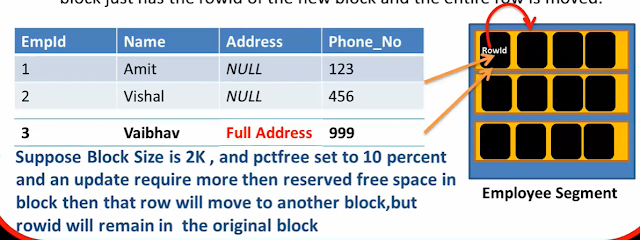
SQL> ================now row migration because of UPDATE statement======
SQL> update sample set name='abc' , address='xyz', email='gmail.com' where id=3;
1 row updated.
SQL> commit;
Commit complete.
SQL> update sample set name='samik';
3 rows updated.
SQL> update sample set name='neel' where id=1;
1 row updated.
SQL>
SQL> select * from sample;
ID ---------- NAME -------------------------------------------------------------------------------- ADDRESS
SQL>
SQL> select rowid from sample;
ROWID
------------------
AAAFrTAAGAAAAIMAAA
AAAFrTAAGAAAAIMAAB
AAAFrTAAGAAAAIMAAC
SQL> select rowid,id from sample;
ROWID ID
------------------ ----------
AAAFrTAAGAAAAIMAAA 1
AAAFrTAAGAAAAIMAAB 2
AAAFrTAAGAAAAIMAAC 3
SQL>
SQL> select rowid, id, dbms_rowid.rowid_block_number(rowid) as block_num from sample;
ROWID ID BLOCK_NUM
------------------ ---------- ----------
AAAFrTAAGAAAAIMAAA 1 524
AAAFrTAAGAAAAIMAAB 2 524
AAAFrTAAGAAAAIMAAC 3 524
SQL>
SQL>
SQL> ==============how to identify row migration is happening or not=====================
SQL>
SQL>
SQL> desc v$statname
Name Null? Type
----------------------------------------- -------- ----------------------------
STATISTIC# NUMBER
NAME VARCHAR2(64)
CLASS NUMBER
STAT_ID NUMBER
DISPLAY_NAME VARCHAR2(64)
CON_ID NUMBER
SQL>
SQL> select * from v$statname where name='table fetch continued row'
2 /
STATISTIC# NAME
---------- ----------------------------------------------------------------
CLASS STAT_ID
---------- ----------
DISPLAY_NAME CON_ID
---------------------------------------------------------------- ----------
1017 table fetch continued row
64 1413702393
table fetch continued row 0
SQL> col name for a20
SQL> /
STATISTIC# NAME CLASS STAT_ID
---------- -------------------- ---------- ----------
DISPLAY_NAME CON_ID
---------------------------------------------------------------- ----------
1017 table fetch continue 64 1413702393
d row
table fetch continued row 0
SQL> col DISPLAY_NAME for a25
SQL> /
STATISTIC# NAME CLASS STAT_ID DISPLAY_NAME
---------- -------------------- ---------- ---------- -------------------------
CON_ID
----------
1017 table fetch continue 64 1413702393 table fetch continued row
d row
0
SQL> set lines 200
SQL> /
STATISTIC# NAME CLASS STAT_ID DISPLAY_NAME CON_ID
---------- -------------------- ---------- ---------- ------------------------- ----------
1017 table fetch continue 64 1413702393 table fetch continued row 0
d row
SQL> col NAME for a45
SQL> /
STATISTIC# NAME CLASS STAT_ID DISPLAY_NAME CON_ID
---------- --------------------------------------------- ---------- ---------- ------------------------- ----------
1017 table fetch continued row 64 1413702393 table fetch continued row 0
SQL>
SQL>
SQL> desc V$mystat
Name Null? Type
---------------------- --------
SID NUMBER
STATISTIC# NUMBER
VALUE NUMBER
CON_ID NUMBER
SQL>
SQL>
SQL> select name,value from v$statname s inner join v$mystat m on m.STATISTIC#=s.STATISTIC# where s.name='table fetch continued row';
NAME VALUE
--------------------------------------------- ----------
table fetch continued row 6
SQL>
SQL>
SQL> select * from sample;
ID NAME
---------- ---------------------------------------------
ADDRESS
---------------------------------------------------------------------------------------------------------
FATHERNAME
---------------------------------------------------------------------------------------------------------
EMAIL
-----------------------------------------------------------------------
SQL>
SQL>
SQL> select count(name) from sample;
COUNT(NAME)
-----------
3
SQL> select name,value from v$statname s inner join v$mystat m on m.STATISTIC#=s.STATISTIC# where s.name='table fetch continued row';
NAME VALUE
--------------------------------------------- ----------
table fetch continued row 14
SQL>
SQL>
SQL> =============number of extra blocking are getting read because your row has been migrated;================
SQL>
SQL>
SQL> select count(address) from sample;
COUNT(ADDRESS)
--------------
1
SQL> select name,value from v$statname s inner join v$mystat m on m.STATISTIC#=s.STATISTIC# where s.name='table fetch continued row';
NAME VALUE
--------------------------------------------- ----------
table fetch continued row 18
SQL>
SQL> desc sample
Name Null? Type
------------------------------- -------- ----------------------------------------------------------------------------
ID NOT NULL NUMBER
NAME CHAR(2000)
ADDRESS CHAR(2000)
FATHERNAME CHAR(2000)
EMAIL CHAR(2000)
SQL>
SQL> select count(email) from sample;
COUNT(EMAIL)
------------
1
SQL>
SQL> select name,value from v$statname s inner join v$mystat m on m.STATISTIC#=s.STATISTIC# where s.name='table fetch continued row';
NAME VALUE
--------------------------------------------- ----------
table fetch continued row 24
SQL>
SQL>
SQL>=================== "We have to stop this row migration and row chaining" =======================
S
SQL>
SQL>
SQL>
SQL>
SQL> =========Let's check row chaining now =====================================
SQL>
SQL>
SQL>
SQL> create table example (id number constraint idpk2 primary key , name char(2000), address char(2000), email char(2000)) tablespace tbs201;
Table created.
SQL>
SQL>
SQL> insert into example values (1,'abc','xyz','abc@gmail.com');
1 row created.
SQL> commit;
Commit complete.
SQL> select id from exmple;
select id from exmple
*
ERROR at line 1:
ORA-00942: table or view does not exist
SQL> select id from example;
ID
----------
1
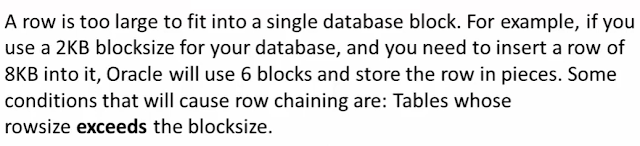
SQL> ----------Our block is 2k and our records are more than 8k---------------
SQL>
SQL> ----------We have a view from that , we have count the row Chaining------
SQL>
SQL>
SQL> select table_name, chain_cnt from user_tables where table_name='EXAMPLE';
TABLE_NAME CHAIN_CNT
-------------------------------------------
EXAMPLE
SQL>
SQL> analyze table example compute statistics;
Table analyzed.
SQL> select table_name, chain_cnt from user_tables where table_name='EXAMPLE';
TABLE_NAME CHAIN_CNT
-------------------------------
EXAMPLE 1
SQL>
SQL> col table_name for a20
SQL> /
TABLE_NAME CHAIN_CNT
-------------------- ----------
EXAMPLE 1
SQL>
SQL>
SQL> ------------ it means that your table has Row Chain -----------------and it showing Chain Count =1 ---
SQL>
SQL>
SQL>
SQL> insert into example values (2,'abc','xyz','abc@gmail.com');
1 row created.
SQL> commit;
Commit complete.
SQL> analyze table example compute statistics;
Table analyzed.
SQL> select table_name, chain_cnt from user_tables where table_name='EXAMPLE';
TABLE_NAME CHAIN_CNT
-------------------- ----------
EXAMPLE 2
SQL>
SQL> select name,value from v$statname s inner join v$mystat m on m.STATISTIC#=s.STATISTIC# where s.name='table fetch continued row';
NAME VALUE
--------------------------------------------- ----------
table fetch continued row 28
SQL>
SQL>
SQL> select * from example;
ID NAME
---------- -----------------------
ADDRESS
----------------------------------
EMAIL
----------------------------------
1 abc
SQL> select name,value from v$statname s inner join v$mystat m on m.STATISTIC#=s.STATISTIC# where s.name='table fetch continued row';
NAME VALUE
--------------------------------------------- ----------
table fetch continued row 37
SQL>
SQL>
SQL> ---------------------------Solution------------------
SQL>
SQL> ------------increase the block size------------------
SQL>
SQL>
SQL>
SQL> ------------move the table into that block size-----------
SQL>
SQL>
SQL> alter table example move pctfree 10 pctused 50 tablespace TBS19;
SQL> alter index idpk2 rebuild;
SQL> analyze table example compute statistics;

SQL> select name,value from v$statname s inner join v$mystat m on m.STATISTIC#=s.STATISTIC# where s.name='table fetch continued row';
NAME VALUE
--------------------------------------------- ----------
table fetch continued row 41
Again Value is 41, it means that no row migration and row chaining ...
SQL> select name,value from v$statname s inner join v$mystat m on m.STATISTIC#=s.STATISTIC# where s.name='table fetch continued row';
NAME VALUE
--------------------------------------------- ----------
table fetch continued row 41
Now go to cd $ORACLE_HOME/rdbms/admin/
$ORACLE_HOME/rdbms/admin/
utlchain.sql
SQL>@utlchain.sql

Now analyze the table "example" list chained row...
SQL> analyze table example list chained row;
Table anaylzed.
You will get output in the chained_rows table.

